We may earn a commission from links on this page, at no extra cost to you.
The best under-desk walking pad for most home offices is the WalkingPad P1: its 47 by 16.5 inch walking area is the widest belt among the folding pads we cover, it runs at the 0.3 to 3.75 mph speeds people actually type at, and Garage Gym Reviews names it the best overall under-desk treadmill in its September 2026 update. Desk walking rewards different specs than a general-purpose pad. Top speed and jogging modes barely matter at 1.5 to 2.5 mph; what matters is a belt wide and long enough to keep your feet centered while your eyes are on a screen, a duty rating that covers a full workday, a deck low enough for your standing desk to clear, and controls you can use without stopping. This guide ranks seven pads on exactly those points. If you want incline workouts, jogging, or the lowest price instead, start with our best walking pads by need.
Our quick picks
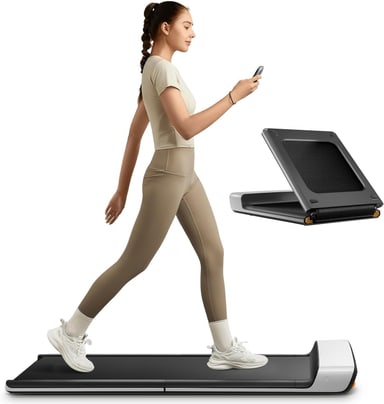
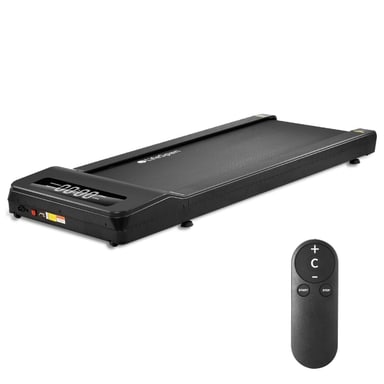
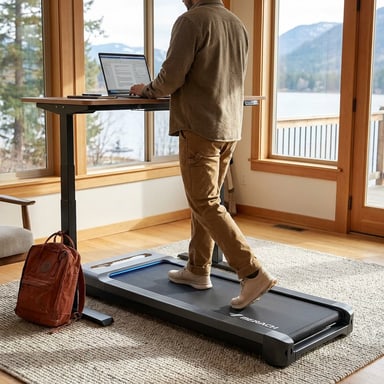
Best under-desk walking pad overall: WalkingPad P1
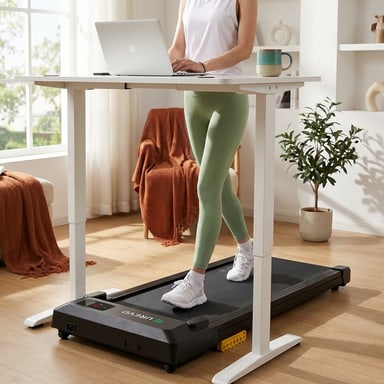
The P1 gets the desk basics right. WalkingPad lists a 47 by 16.5 inch walking area, so you have both the length for a natural stride at 2 to 3 mph and the width to drift a little while you read without catching the edge. The deck stands 5 inches tall, the speed range starts at 0.3 mph for slow typing, and you change pace from the remote, the app, or an automatic mode that responds to where you walk on the belt. After work it folds in half to 32.5 by 21.5 inches.
The limits matter for some buyers. It is rated to 220 lb, the low end of this group, so walkers over about 170 lb should look at the TX6 or W50 for headroom. It uses a brush motor (746 W input per WalkingPad) and tops out at 3.75 mph, which is plenty at a desk. It carries 4.2 stars across 1,234 Amazon ratings, and Amazon's review summary reports mixed reliability, with some early failures and some remotes that would not pair. Our full WalkingPad P1 review covers the motor and owner reports in detail.
BEST UNDER-DESK OVERALL
WalkingPad P1 Foldable Walking Pad
The WalkingPad P1 is WalkingPad's classic fold-in-half pad, and its 47 by 16.5 inch walking area is the widest belt among the folding pads Kit covers. WalkingPad lists a 5 inch height, a 0.3 to 3.75 mph speed range, a 220 lb limit and a 62 lb weight; it folds to 32.5 by 21.5 inches. Speed runs from the remote, the app, or an automatic mode. It uses a brush motor rather than the brushless motors on the newer Z1 and C2, and it has no incline.
Best for: Desk walkers under about 170 lb who want the widest folding belt for a steady typing stance and a pad that folds away after work.
- 16.5 inch wide by 47 inch long walking area, the roomiest belt among the folding pads Kit covers
- Folds in half to 32.5 by 21.5 inches and stands 5 inches tall open
- 220 lb limit and a 3.75 mph ceiling, both at the low end of the pads Kit covers
Kit Score 7.3/10 · Check current price · how we score gear
Buy on AmazonBest for all-day desk walking: LifeSpan TX6-GlowUp
If you plan to walk most of the workday, the TX6-GlowUp is the only pad here built and rated for it. LifeSpan specifies 7 hours of use per day, a 400 lb user limit, and a 20 by 48 inch belt, as wide as a full treadmill's, on a phenolic deck with six compression shocks. The 4.5 HP peak brushless motor drives a self-lubricating belt from 0.4 to 6.0 mph, so there is no lube schedule to remember, and the frame carries a 10-year warranty.
LifeSpan leaves out incline on purpose, citing ergonomists who say walking on a grade while you work pulls your body out of a neutral position. The step-up height is 5.8 inches, so your desk needs to rise about 2 inches higher than it would for the slimmest pads here. It weighs 98.5 lb and measures 60 by 28 inches, rolling on two front wheels but never folding, so it suits a dedicated office. It costs several times as much as any consumer pad, is sold only direct from LifeSpan, and has just 6 reviews on LifeSpan's site so far.
BEST FOR ALL-DAY WALKING
LifeSpan TX6-GlowUp Under Desk Treadmill
The LifeSpan TX6-GlowUp is an office-grade under-desk treadmill rather than a consumer walking pad. LifeSpan rates it for 7 hours of use per day and users up to 400 lb, on a 20 by 48 inch self-lubricating belt over a phenolic deck with six compression shocks, driven by a 4.5 HP peak brushless motor at 0.4 to 6.0 mph. It stands 5.8 inches tall, measures 60 by 28 inches, and weighs 98.5 lb, so it rolls on front wheels but does not fold. LifeSpan leaves out incline on purpose, citing ergonomists. The frame carries a 10-year warranty.
Best for: Remote workers who walk for hours every day, heavier walkers who want a 400 lb rating with a wide belt, and offices sharing one machine.
- 20 by 48 inch belt and a 400 lb rating, far roomier than any folding walking pad
- Rated for 7 hours of use per day, with a self-lubricating belt and a 10-year frame warranty
- Costs several times as much as a consumer walking pad and is sold only direct from LifeSpan
Kit Score 8.1/10 · Check current price · how we score gear
Buy at LifeSpan FitnessBest for heavier desk walkers: MERACH W50
The W50 is the consumer-priced pad for long desk days and heavier walkers. MERACH rates it to 400 lb and up to 10 hours of continuous use, the only continuous-use figure published for a consumer pad here, and its 16.5 by 41.3 inch belt matches the P1's width. The 0 to 12 percent motorized incline is there for breaks, and speed and grade run from a remote or the MERACH app.
Two caveats for calls. MERACH quotes both "25 dB" and "40 dB" on the same product page, so treat neither as a measurement, and maker noise figures describe the motor, not your footsteps; an equipment mat closes most of that gap. The W50 stands 6.1 inches tall and weighs 69.2 lb without folding, so it lives under the desk rather than in a closet. See the full MERACH W50 review for owner feedback on stride length and noise.
BEST FOR HEAVIER DESK WALKERS
MERACH W50 Walking Pad with 12% Auto Incline
The MERACH W50 is built for users who want more than flat walking: a motorized 0 to 12% incline, a 400 lb weight capacity, and a brushless motor rated 1.25 HP continuous and 3.5 HP peak. MERACH quotes both 25 dB and 40 dB for noise on the same product page. The 16.5 x 41.3-inch belt is spacious for a walking pad, and the unit is rated for up to 10 continuous hours of use.
Best for: Standing-desk users who want incline training throughout the workday, heavier users over 250 lbs who need a confidence-inspiring deck, or anyone running a home office where the pad stays in place permanently.
- Motorized 0 to 12% incline plus a wider 16.5-inch belt and a 10-hour continuous-use rating, the only continuous-use figure published among these pads
- 400 lb weight capacity: the most headroom for heavier users or all-day office deployment
- No fold-flat storage: at 50.2 inches long and 69.2 lb, this unit lives under a standing desk and does not move easily between rooms
Kit Score 8.5/10 · Check current price · how we score gear
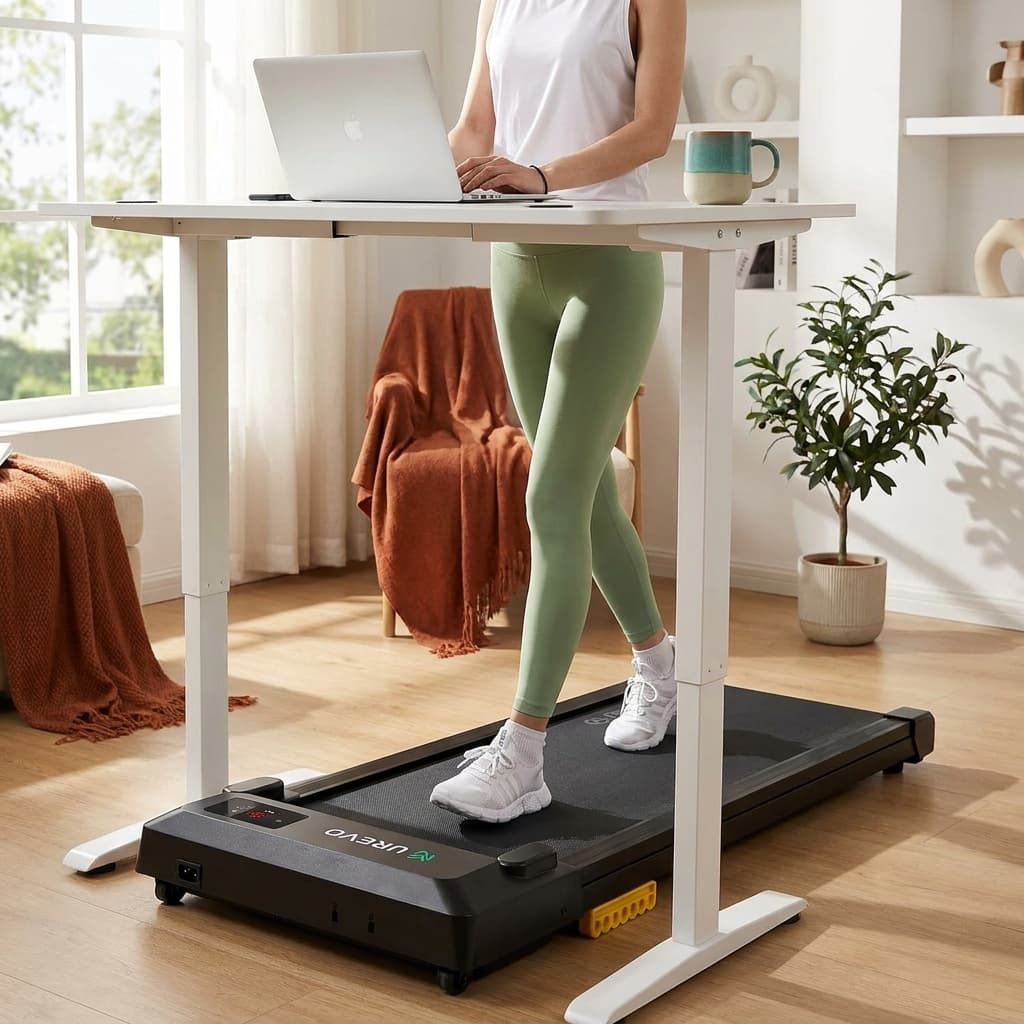
Buy on AmazonBest budget under-desk pad: UREVO Smart Walking Pad
The Smart Walking Pad is the lowest-cost way to find out whether desk walking sticks for you. The current Amazon listing rates it at 0.6 to 4 mph from a 2.5 HP motor with a 265 lb user rating, a 35.43 by 15 inch belt, and a 4.1 inch slim profile, tied for the lowest deck here. That low deck matters most for desks with a limited height range.
At about 40 lb (39.7 lb on the listing) it is also the lightest pad here, so it slides out from under the desk one-handed. The shorter belt is the trade: by our fit checker's math, a 5'10" walker needs about 36.5 inches of belt at 2 mph, so taller walkers will feel crowded above a slow typing pace. There is no incline and no fold. The full UREVO Smart Walking Pad review covers long-term owner feedback.
BEST BUDGET
UREVO Smart Walking Pad
The UREVO Smart Walking Pad packs a 2.5 HP quiet motor, double shock-absorbing belt, and Bluetooth app control into one of the more affordable under-desk options. At a 265 lb capacity (per the current Amazon listing) and a 35.43-inch belt, it covers most users and supports remote or app speed control without the premium price of branded alternatives.
Best for: Work-from-home walkers who want reliable daily-use performance and app tracking without paying a premium brand markup.
- 2.5 HP motor and multi-layer shock absorption at a budget price point
- App-connected with MIIT workout modes and step tracking, remote included
- 35.43-inch belt is much shorter than the WalkingPad C2's 47.2 inches, which may feel limiting for taller users or long strides
Kit Score 8.0/10 · Check current price · how we score gear
Buy on AmazonBest for small apartments: WalkingPad Z1
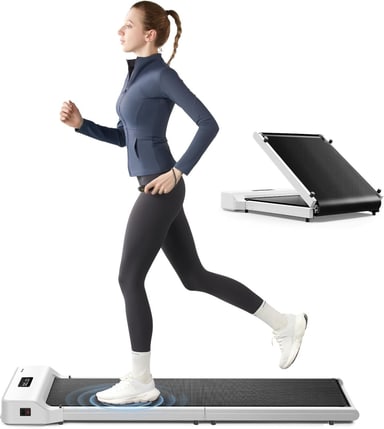
The Z1 solves the problem that ends most desk-walking plans in a studio: where does it go at 6 p.m.? WalkingPad's specs give a 4.1 inch tall deck and a 47.6 by 15.7 inch walking area, so it handles tall strides at the desk, then folds in half to 31.8 by 22 by 5.4 inches for a closet floor or under a bed. At 51 lb it is the lightest folding pad we cover, and Tom's Guide picks it as the best WalkingPad in its under-desk treadmill guide.
It runs at 1 to 4 mph from a 2.25 HP brushless motor with remote and app control, and it is rated to 242 lb. Its 15.7 inch belt is narrower than the P1's, and Amazon's review summary flags belt drift and a few early belt failures, so register the 1-year warranty. If you want FootSense speed control, the WalkingPad C2 folds the same way; our WalkingPad C2 vs Z1 comparison shows where each wins, and the WalkingPad Z1 review covers it in full.
BEST FOR SMALL APARTMENTS
WalkingPad Z1 Foldable Walking Pad
The WalkingPad Z1 is the compact member of WalkingPad's fold-in-half line. Open, it gives a 47.6 by 15.7 inch walking area on a 4.1 inch tall deck; folded, it measures 31.8 by 22 by 5.4 inches, small enough for a closet floor or under a bed. WalkingPad rates it to 242 lb at 1 to 4 mph, with a 2.25 HP brushless motor (the Amazon listing says 2 HP) and remote or app speed control. There is no incline. At 51 lb it is lighter than the C2 and costs less.
Best for: Apartment walkers who need the pad to fold away after every session but still want a long deck for a natural stride.
- Folds in half to 31.8 by 22 inches, yet opens to a 47.6 inch walking area for a full stride
- 4.1 inches tall and 51 lb, the slimmest folding pad Kit covers
- No incline, a 4 mph ceiling, and a standard 15.7 inch belt width
Kit Score 7.5/10 · Check current price · how we score gear
Buy on AmazonBest for incline breaks: UREVO CyberPad
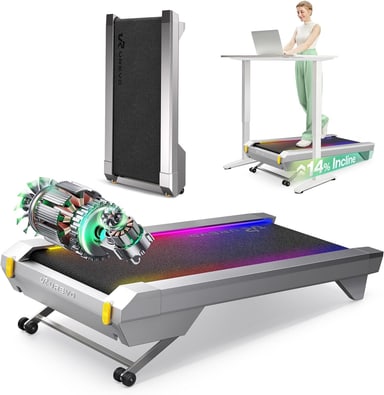
The CyberPad earns a desk spot because UREVO designed this version, the CyberPad for Office (model URTM051), to sit under a standing desk: UREVO lists a 42.9 by 22.8 inch footprint, a 6.3 inch profile, and a 16.5 inch wide walking area. Its 0 to 14 percent motorized incline is the steepest here, set from the remote or app without stopping.
Use the grade on breaks, not while you type. Even LifeSpan, which builds desk treadmills, leaves incline out for ergonomic reasons. The walking area is 39.4 inches long, enough for most heights at desk pace but shorter than the WalkingPads. UREVO quotes 35 dB without a test method. Its product page rates it to 400 lb, while UREVO's own manual and the Amazon listing say 300 lb, so plan on the lower figure. It does not fold and weighs 63.1 lb, though the manual allows standing it upright against a wall. The UREVO CyberPad review has the full breakdown, and CyberPad vs MERACH W50 compares the two incline pads here.
BEST FOR INCLINE BREAKS
UREVO CyberPad Smart Walking Pad with 14% Auto Incline
The UREVO CyberPad is an incline-first walking pad: a motorized 0 to 14% incline in 14 levels, changed from the remote or app without stepping off, on a 39.4 by 16.5 inch walking area. The Amazon listing is the CyberPad for Office (model URTM051), the lower 42.9 by 22.8 by 6.3 inch version UREVO designs for under-desk walking. UREVO's product page says 400 lb, but its own user manual and the Amazon listing say 300 lb, so plan on 300. Top speed is 4.0 mph. UREVO quotes 35 dB for its dual brushless motors without a test method.
Best for: Walkers who want real hill work at home, with a motorized grade they can change mid-session, and who will mostly use incline away from typing.
- 0 to 14% motorized incline, the steepest grade of any walking pad Kit covers, adjustable mid-walk from the remote or app
- 16.5 inch wide walking area and a 6.3 inch profile UREVO sized for standing desks
- Tops out at 4.0 mph and the 39.4 inch walking area is shorter than the long-deck folding pads
Kit Score 8.0/10 · Check current price · how we score gear
Buy on AmazonBest for tight floor space: Egofit Walker Pro M1
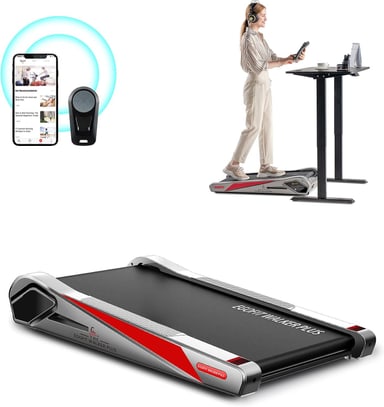
The Walker Pro M1 is the pad for a desk with almost no room behind it. Egofit lists an overall size of 38.39 by 21.85 inches, the shortest pad we cover, while keeping a 16.54 inch wide walking area. The deck sits at a fixed 5% incline, which adds a little effort at slow speeds, and it runs at 0.62 to 3.11 mph with remote and app control. BarBend rates it the best compact under-desk treadmill.
The compromise is stride room. The walking area is only 34.25 inches long, and by our fit checker's math even a 5'4" walker needs about 33.7 inches at 2 mph, so it suits slow typing paces and shorter walkers. It stands 6.89 inches tall, the highest deck here, so check your desk's range. It is rated to 220 lb, and Amazon's review summary reports mixed reliability and remote problems across its 171 ratings.
BEST FOR TIGHT FLOOR SPACE
Egofit Walker Pro M1 Compact Under Desk Treadmill
The Egofit Walker Pro M1 is built around one number: it is 38.39 inches long (21.85 inches wide), the shortest walking pad Kit covers, so it fits desks and rooms where a 50 to 57 inch pad will not. Egofit sets the deck at a fixed 5% incline, rates it to 220 lb at 0.62 to 3.11 mph, and lists a 34.25 by 16.54 inch walking area, a 6.89 inch height and a 2.0 HP DC motor. It arrives fully assembled with a remote and app control. The short walking area limits stride, so it suits slow desk walking more than brisk walks.
Best for: Desk walkers with very little floor space who walk slowly while they work and are under about 170 lb.
- 38.39 inches long, the shortest walking pad Kit covers, for rooms where a 50 inch pad will not fit
- Fixed 5% incline adds effort at slow desk speeds without any adjustment
- 34.25 inch walking area and a 3.11 mph ceiling suit slow desk walking, not brisk walks or tall strides
Kit Score 6.8/10 · Check current price · how we score gear
Buy on AmazonWhat about the Strol 2E Pro and Goplus 2-in-1?
Both are picks in our best walking pads guide, and both work under a desk, but their main strength is a jogging mode you cannot use there. The UREVO Strol 2E Pro stands a low 4.2 inches with its handlebar down and walks at 0.6 to 4.0 mph on a 36.2 by 15.2 inch belt; its incline and 6.2 mph mode need the handlebar up. The Goplus 2-in-1's desk mode tops out near 2.5 mph. If you want one pad for desk walking and occasional jogs, read the UREVO Strol 2E Pro review.
Desk-fit specs compared
| Product | Kit Score | Price | Best for |
|---|---|---|---|
| WalkingPad P1 Foldable Walking Pad | 7.3 | Check current price | Best for: Desk walkers under about 170 lb who want the widest folding belt for a steady typing stance and a pad that folds away after work. Why it stands out: 16.5 inch wide by 47 inch long walking area, the roomiest belt among the folding pads Kit covers Tradeoff: 220 lb limit and a 3.75 mph ceiling, both at the low end of the pads Kit covers |
| LifeSpan TX6-GlowUp Under Desk Treadmill | 8.1 | Check current price | Best for: Remote workers who walk for hours every day, heavier walkers who want a 400 lb rating with a wide belt, and offices sharing one machine. Why it stands out: 20 by 48 inch belt and a 400 lb rating, far roomier than any folding walking pad Tradeoff: Costs several times as much as a consumer walking pad and is sold only direct from LifeSpan |
| MERACH W50 Walking Pad with 12% Auto Incline | 8.5 | Check current price | Best for: Standing-desk users who want incline training throughout the workday, heavier users over 250 lbs who need a confidence-inspiring deck, or anyone running a home office where the pad stays in place permanently. Why it stands out: Motorized 0 to 12% incline plus a wider 16.5-inch belt and a 10-hour continuous-use rating, the only continuous-use figure published among these pads Tradeoff: No fold-flat storage: at 50.2 inches long and 69.2 lb, this unit lives under a standing desk and does not move easily between rooms |
| UREVO Smart Walking Pad | 8.0 | Check current price | Best for: Work-from-home walkers who want reliable daily-use performance and app tracking without paying a premium brand markup. Why it stands out: 2.5 HP motor and multi-layer shock absorption at a budget price point Tradeoff: 35.43-inch belt is much shorter than the WalkingPad C2's 47.2 inches, which may feel limiting for taller users or long strides |
| WalkingPad Z1 Foldable Walking Pad | 7.5 | Check current price | Best for: Apartment walkers who need the pad to fold away after every session but still want a long deck for a natural stride. Why it stands out: Folds in half to 31.8 by 22 inches, yet opens to a 47.6 inch walking area for a full stride Tradeoff: No incline, a 4 mph ceiling, and a standard 15.7 inch belt width |
| UREVO CyberPad Smart Walking Pad with 14% Auto Incline | 8.0 | Check current price | Best for: Walkers who want real hill work at home, with a motorized grade they can change mid-session, and who will mostly use incline away from typing. Why it stands out: 0 to 14% motorized incline, the steepest grade of any walking pad Kit covers, adjustable mid-walk from the remote or app Tradeoff: Tops out at 4.0 mph and the 39.4 inch walking area is shorter than the long-deck folding pads |
| Egofit Walker Pro M1 Compact Under Desk Treadmill | 6.8 | Check current price | Best for: Desk walkers with very little floor space who walk slowly while they work and are under about 170 lb. Why it stands out: 38.39 inches long, the shortest walking pad Kit covers, for rooms where a 50 inch pad will not fit Tradeoff: 34.25 inch walking area and a 3.11 mph ceiling suit slow desk walking, not brisk walks or tall strides |
WalkingPad P1 Foldable Walking Pad
- Best for
- Desk walkers under about 170 lb who want the widest folding belt for a steady typing stance and a pad that folds away after work.
- Why it stands out
- 16.5 inch wide by 47 inch long walking area, the roomiest belt among the folding pads Kit covers
- Tradeoff
- 220 lb limit and a 3.75 mph ceiling, both at the low end of the pads Kit covers
LifeSpan TX6-GlowUp Under Desk Treadmill
- Best for
- Remote workers who walk for hours every day, heavier walkers who want a 400 lb rating with a wide belt, and offices sharing one machine.
- Why it stands out
- 20 by 48 inch belt and a 400 lb rating, far roomier than any folding walking pad
- Tradeoff
- Costs several times as much as a consumer walking pad and is sold only direct from LifeSpan
MERACH W50 Walking Pad with 12% Auto Incline
- Best for
- Standing-desk users who want incline training throughout the workday, heavier users over 250 lbs who need a confidence-inspiring deck, or anyone running a home office where the pad stays in place permanently.
- Why it stands out
- Motorized 0 to 12% incline plus a wider 16.5-inch belt and a 10-hour continuous-use rating, the only continuous-use figure published among these pads
- Tradeoff
- No fold-flat storage: at 50.2 inches long and 69.2 lb, this unit lives under a standing desk and does not move easily between rooms
UREVO Smart Walking Pad
- Best for
- Work-from-home walkers who want reliable daily-use performance and app tracking without paying a premium brand markup.
- Why it stands out
- 2.5 HP motor and multi-layer shock absorption at a budget price point
- Tradeoff
- 35.43-inch belt is much shorter than the WalkingPad C2's 47.2 inches, which may feel limiting for taller users or long strides
WalkingPad Z1 Foldable Walking Pad
- Best for
- Apartment walkers who need the pad to fold away after every session but still want a long deck for a natural stride.
- Why it stands out
- Folds in half to 31.8 by 22 inches, yet opens to a 47.6 inch walking area for a full stride
- Tradeoff
- No incline, a 4 mph ceiling, and a standard 15.7 inch belt width
UREVO CyberPad Smart Walking Pad with 14% Auto Incline
- Best for
- Walkers who want real hill work at home, with a motorized grade they can change mid-session, and who will mostly use incline away from typing.
- Why it stands out
- 0 to 14% motorized incline, the steepest grade of any walking pad Kit covers, adjustable mid-walk from the remote or app
- Tradeoff
- Tops out at 4.0 mph and the 39.4 inch walking area is shorter than the long-deck folding pads
Egofit Walker Pro M1 Compact Under Desk Treadmill
- Best for
- Desk walkers with very little floor space who walk slowly while they work and are under about 170 lb.
- Why it stands out
- 38.39 inches long, the shortest walking pad Kit covers, for rooms where a 50 inch pad will not fit
- Tradeoff
- 34.25 inch walking area and a 3.11 mph ceiling suit slow desk walking, not brisk walks or tall strides
These are the numbers that decide whether a pad works under your desk. Figures are the makers' published specs unless marked as the Amazon listing.
| Pad | Deck height | Belt (L x W) | Desk speed range | Duty rating | Noise claim | Footprint | Pad weight |
|---|---|---|---|---|---|---|---|
| WalkingPad P1 | 5 in | 47 x 16.5 in | 0.3 to 3.75 mph | None published | None | 56.5 x 21.5 in; folds to 32.5 x 21.5 in | 62 lb |
| LifeSpan TX6-GlowUp | 5.8 in | 48 x 20 in | 0.4 to 6.0 mph | 7 hours per day | None | 60 x 28 in | 98.5 lb |
| MERACH W50 | 6.1 in | 41.3 x 16.5 in | 0.6 to 4.0 mph | 10 hours continuous | 25 dB and 40 dB, both on MERACH's page | 50.2 x 22.2 in | 69.2 lb |
| UREVO Smart Walking Pad | 4.1 in (Amazon) | 35.43 x 15 in (Amazon) | 0.6 to 4 mph (Amazon) | None published | None | 42 x 19 in (Amazon) | 39.7 lb (Amazon) |
| WalkingPad Z1 | 4.1 in | 47.6 x 15.7 in | 1 to 4 mph | None published | None | 56.1 x 22 in; folds to 31.8 x 22 in | 51 lb |
| UREVO CyberPad | 6.3 in | 39.4 x 16.5 in | 0.6 to 4.0 mph | None published | 35 dB (UREVO) | 42.9 x 22.8 in | 63.1 lb |
| Egofit Walker Pro M1 | 6.89 in | 34.25 x 16.54 in | 0.62 to 3.11 mph | None published | None | 38.39 x 21.85 in | 48.5 lb (55 lb on Amazon) |
How we picked
Every pick is weighed for desk use specifically: belt length and width at typing speeds, a published duty rating for long days, deck height against standing-desk range, controls you can use without stopping, published noise figures, floor footprint, and pad weight for moving it out of the way. Top speed and jogging modes count for little here. Specs come from the makers' product pages and the live Amazon listings, and we show both where they disagree; owner ratings come from Amazon, or LifeSpan's own site for the TX6, which Amazon does not sell. We cross-checked our shortlist against outlets that test under-desk treadmills hands-on, including Garage Gym Reviews, Wired, Tom's Guide and BarBend. Scores follow the Kit Score methodology. This is research from published specs and owner reviews; we did not walk on these pads ourselves.
What makes a walking pad work under a desk
Under-desk buying checklist
Measure your clearance first
Stand on the floor, set your forearms level, and measure floor to elbow. Add the pad's deck height (4.1 to 6.9 inches for these seven), and that is the height your desk surface should reach, or sit up to 2 inches below. Most electric standing desks with a maximum of 48 inches or more cover it; fixed desks and many desk converters do not.
Size the belt to your stride at desk pace
At 2 mph, our fit checker estimates about 34 inches of belt for a 5'4" walker, 36.5 inches at 5'10", and 38.5 inches at 6'2", including a few inches to drift. Add about 3 inches for 2.5 mph. The 47 to 48 inch WalkingPad and LifeSpan belts cover nearly everyone; the 34 to 36 inch belts suit slower paces and shorter walkers.
Prioritize width and controls over top speed
You will spend most desk sessions at 1.5 to 2.5 mph, where every pad here is comfortable. What separates them is how centered your feet stay while you look at a screen (16.5 inches or wider helps) and whether you can change pace without stopping.
Match the duty rating to your day
Only LifeSpan (7 hours a day) and MERACH (10 continuous hours) publish one. If you plan to walk for hours, buy one of those or plan breaks.
Treat noise figures with caution
Only UREVO (35 dB for the CyberPad) and MERACH (25 dB and 40 dB for the W50) publish figures here, neither with a test method. A dense mat under the pad and a directional microphone do more for your calls than any spec sheet.
Buy capacity headroom
Choose a pad rated at least 50 lb above your body weight. Ratings here run from 220 lb (P1, Egofit) to 400 lb (TX6, W50).
Leave room behind you
A walking pad pushes your standing position back from the desk. Check that the pad's footprint, from 38.4 inches (Egofit) to 60 inches (LifeSpan), plus your chair's parking spot fits the room.
The free walking pad fit checker runs this math for your height, weight, and desk range, then shows which of these pads clear every check. For every figure with its source, download the walking pad specs dataset.
The best under-desk pad is the one quiet and steady enough that nobody on your 10 a.m. call knows you are walking.
Frequently asked questions
What is the best under-desk walking pad?
For most home offices, the WalkingPad P1: a 47 by 16.5 inch walking area, a 5 inch deck, desk speeds from 0.3 mph, and a fold-in-half design, rated to 220 lb. If you walk for hours every day or weigh more, the LifeSpan TX6-GlowUp (7 hours a day, 400 lb) or the MERACH W50 (10 continuous hours, 400 lb) is the stronger choice.
How much clearance do I need under my desk for a walking pad?
Add the pad's deck height to your standing elbow height, then confirm your desk rises that high. The pads here stand 4.1 inches (UREVO Smart, WalkingPad Z1) to 6.89 inches (Egofit) tall. For a walker with a 43 inch elbow height, that means a desk that reaches about 47 to 50 inches. Most electric standing desks have the range; most fixed desks at seated height do not.
Can I use a walking pad during video calls?
Usually, yes. Walking at 1.5 to 2 mph keeps both motor and footfall noise down, and a directional microphone aimed at your mouth rather than the desk picks up far less floor noise. UREVO quotes 35 dB for the CyberPad and MERACH quotes both 25 dB and 40 dB for the W50, none with a test method, so do a test call before your first big meeting.
What speed should I walk while typing?
Most people type accurately at 1.2 to 2 mph and comfortably take calls at 2 to 2.5 mph. Above 3 mph, arm swing and torso movement start to interfere with fine motor work, so save faster speeds for walking breaks. A 3 to 4 mph top speed is plenty for a desk pad.
Does belt width matter for walking at a desk?
Yes, more than it does for walking laps. When your eyes are on a screen, your feet drift, and a wider belt gives you more margin before a foot catches the edge. The LifeSpan TX6-GlowUp's 20 inch belt is the widest here, the P1, W50, CyberPad and Egofit run about 16.5 inches, and the Z1 and UREVO Smart run 15 to 15.7 inches, which works for most people at 2 mph.
Can I walk on a walking pad all day?
Only on a pad rated for it, and with breaks. LifeSpan rates the TX6-GlowUp for 7 hours a day and MERACH rates the W50 for 10 continuous hours; the other makers here publish no duty rating. Spread long days into sessions, keep the belt lubricated if the maker requires it, and watch the user limit.
Should I use incline while working?
Probably not. LifeSpan leaves incline off its desk treadmills, citing ergonomists who say a grade pulls your body out of a neutral working position. Save the CyberPad's 14% or the W50's 12% for break-time walks and work on a flat deck.
Are walking pads quiet enough for an apartment?
At desk speeds, motor noise is modest; the bigger issue for downstairs neighbors is footfall vibration through the floor, which no motor spec captures. A dense equipment mat under the pad, walking at 2 mph rather than 3, and avoiding late-night sessions solve most real-world complaints.
Do walking pads damage hardwood floors?
Not directly, but vibration and the pad's feet can scuff or dent a finish over months of daily use, and grit under the pad acts like sandpaper. An equipment mat solves it, quiets footfall at the same time, and keeps the pad from migrating on smooth flooring.
Are under-desk walking pads worth it?
For remote and hybrid workers who struggle to get steps, generally yes: two hours of calls and light work at 2 mph adds roughly 4,000 steps without taking time from the day. You need a desk that genuinely accommodates one, and the habit matters more than the hardware. Our breakdown of whether walking pads are worth it runs the numbers.
Where these numbers come from
| Claim | Source | Checked |
|---|---|---|
| WalkingPad P1: 0.3 to 3.75 mph, 47 x 16.5 in walking area, 220 lb, brush motor, 746 W, 62 lb, 56.5 x 21.5 x 5 in unfolded, 32.5 x 21.5 x 5 in folded | WalkingPad, P1 Foldable Treadmill | Oct 3, 2026 |
| WalkingPad P1: 4.2 stars from 1,234 ratings; WalkingPad P1 is Garage Gym Reviews' best overall under-desk treadmill | Amazon listing, ASIN B0D2ZVB8DJ; Garage Gym Reviews | Oct 3, 2026 |
| LifeSpan TX6-GlowUp: 7 hours per day, 400 lb, 20 x 48 in belt, 0.4 to 6.0 mph, 4.5 HP peak brushless, self-lubricating belt, 5.8 in step-up, 60 x 28 in, 98.5 lb, incline omitted on ergonomic grounds, 10-year frame warranty | LifeSpan, TX6-GlowUp Under Desk Treadmill | Oct 3, 2026 |
| MERACH W50: 16.5 x 41.3 in belt, 50.2 x 22.2 x 6.1 in, 69.2 lb, 0.6 to 4.0 mph, 0 to 12% incline, 400 lb, 25 dB and 40 dB claims, 10 hours continuous use, non-folding | MERACH, NovaWalk W50 TrekPad | Sep 25, 2026 |
| UREVO Smart Walking Pad: 0.6 to 4 mph, 2.5 HP, 265 lb, 35.43 x 15 in belt, 4.1 in profile, 42 x 19 in, 39.7 lb | Amazon listing, ASIN B097BKS6Z9, read through the Amazon Creators API | Sep 25, 2026 |
| WalkingPad Z1: 1 to 4 mph, 47.6 x 15.7 in walking area, 242 lb, 2.25 HP brushless, 51 lb, 56.1 x 22 x 4.1 in unfolded, 31.8 x 22 x 5.4 in folded | WalkingPad, Z1 Under-Desk Treadmill | Oct 3, 2026 |
| UREVO CyberPad for Office: 42.9 x 22.8 x 6.3 in, 39.4 x 16.5 in walking area, 63.1 lb, 400 lb, 0 to 14% auto incline, 35 dB claim; the Amazon listing (ASIN B0F6LJGZ12, model URTM051) says 300 lb | UREVO, CyberPad for Office; Amazon listing | Oct 3, 2026 |
| UREVO CyberPad for Office manual: 136 kg (300 lb) maximum user weight; may be stored upright against a wall | UREVO CyberPad for Office user manual (V2.0, PDF) | Oct 3, 2026 |
| Egofit Walker Pro M1: 0.62 to 3.11 mph, fixed 5% incline, 220 lb, 34.25 x 16.54 in walking area, 38.39 x 21.85 x 6.89 in, 48.5 lb, 2.0 HP DC motor | Egofit, Walker Pro-M1 | Oct 3, 2026 |
| Egofit Walker Pro M1 listing: 55 lb, 4.2 stars from 171 ratings | Amazon listing, ASIN B08R37V99Q | Oct 3, 2026 |
| Belt length needed at 2 mph by height | Kit Authority walking pad fit checker, built on the CADENCE-Adults treadmill cadence study | Oct 3, 2026 |
Choosing between these seven comes down to how many hours you walk, your weight, your desk's height range, and where the pad goes after work. For the full spec-by-spec framework, read the walking pad buying guide, or browse the fitness gear hub and how we research and rate products.
Keep going
Free toolWalking Pad Fit CheckerWhich walking pad fits your height, weight, desk, and floor space.Related guides
 Complete fitness loadoutWeighted-vest starter kitBuild the complete kit
Our recommendations draw on manufacturer documentation, retailer listings, owner feedback, and comparisons with alternatives.
As an Amazon Associate I earn from qualifying purchases. We may earn a commission from links here, at no extra cost to you. How we research →
Top picks
 Best Under-desk OverallWalkingPad P1 Foldable Walking Pad7.3/10
 Best For All-day WalkingLifeSpan TX6-GlowUp Under Desk Treadmill8.1/10
 Best For Heavier Desk WalkersMERACH W50 Walking Pad with 12% Auto Incline8.5/10
 Best BudgetUREVO Smart Walking Pad8.0/10
 Best For Small ApartmentsWalkingPad Z1 Foldable Walking Pad7.5/10