
Packing the wrong charger, or too many of them, is one of the easiest ways to add dead weight and dead batteries to a trip. A little upfront knowledge cuts your charging kit down to one or two smart pieces.
One charger to rule them: multi-port GaN bricks
Gallium nitride (GaN) chargers run cooler and pack more power into a smaller body than older silicon designs. A single 65W or 100W GaN brick with three or four ports, including at least two USB-C ports, can simultaneously charge a laptop, two phones, and a tablet. That is every charging brick you would otherwise carry, consolidated into one.
A travel power strip with USB ports, like the Anker Nano Charging Station, is the other approach. It plugs into one hotel outlet and opens up three or four grounded sockets plus USB ports for the whole room. This matters because hotel desks routinely offer one or two accessible outlets, often occupied by the lamp.
The trade-off: a multi-port charger is lighter and simpler. A travel power strip is heavier but invaluable in rooms with limited outlets or when traveling with a partner.
Dual voltage and why a plug adapter is not a converter
North American household current runs at 120V/60Hz. Most of the world runs at 220–240V/50Hz. Plug the wrong charger into the wrong voltage and you can destroy it or start a fire.
The good news: nearly all modern phone chargers, laptop power bricks, and GaN multi-port chargers are dual voltage. Look for the fine print on the label: "Input: 100–240V, 50/60Hz." That range covers everywhere on earth. If it says that, you only need a plug adapter.
A plug adapter changes the physical shape of the prongs to fit a foreign outlet. It does nothing to the voltage. A voltage converter (or transformer) actually steps the voltage up or down. Converters are bulky, heavy, and mostly relevant for older hair dryers or appliances with a motor. Your electronics almost certainly do not need one, but always read the label to confirm.
A plug adapter changes the shape, not the voltage. Confirm "100–240V" on the charger label before you rely on the adapter alone.
Regional plug types to know: Type A/B (North America, Japan), Type C/E/F (Europe, South America), Type G (UK, Hong Kong, Singapore), Type I (Australia, New Zealand, China). A universal adapter like the TESSAN GaN 65W Travel Adapter covers all of them in one piece.
USB-C PD wattage: matching the charger to the laptop
USB-C Power Delivery (PD) is a charging standard that negotiates wattage between the charger and the device. The charger must meet or exceed the laptop's rated wattage to charge at full speed; a lower-wattage charger will charge slowly or may not charge under load.
Matching USB-C PD wattage to your device
Ultrabooks (MacBook Air, Surface Pro, thin Windows laptops)
45–61W is enough for full-speed charging
Mid-range laptops (13–14 inch, standard performance)
65W covers most; check the original brick
Larger or high-performance laptops
90–100W; some gaming or workstation laptops need even more
Phones and tablets
20–30W is sufficient; they accept any higher-wattage charger without harm
Power banks
Check input rating; faster recharging requires a 30W+ charger into the bank
Over-wattage does no harm: a 100W charger connected to a phone negotiates down to what the phone accepts. Under-wattage on a laptop is the problem to avoid.
Airport and airplane charging: what to count on
Most major airports have USB-A ports built into gate seating. USB-A tops out at 5–12W, which is enough to trickle-charge a phone but will not meaningfully charge a laptop. For faster charging at the airport, find a standard AC outlet (common at many international airports) or use your own multi-port charger.
On the plane: international long-haul flights frequently offer seat-back power. The socket type varies by airline and aircraft: USB-A, USB-C, or an AC outlet at the seat. Business class is more likely to have AC outlets. Economy is less reliable. A fully charged power bank is the more dependable solution for long flights.
Power bank rules: watt-hours and carry-on requirements
Power banks contain lithium batteries and are carry-on only on commercial flights. They cannot go in checked baggage, full stop. Airlines follow IATA and FAA guidelines:
- Up to 100Wh: permitted in carry-on, no approval needed.
- 100–160Wh: permitted in carry-on, requires airline approval (most grant it for personal use).
- Over 160Wh: not permitted on passenger aircraft.
To find the watt-hour rating on a power bank, look for "Wh" printed on the label. If you only see mAh, multiply by the voltage (usually 3.6V or 3.7V) and divide by 1000. A 20,000mAh bank at 3.7V is approximately 74Wh, well under the limit.
For reference, a 20,000mAh bank like the Baseus Blade 100W fully charges most phones three to four times and provides a meaningful top-up to most laptops.
Frequently asked questions
Do I need a voltage converter for international travel?
Almost certainly not for modern electronics. Check the label on each charger for "Input: 100–240V." If it shows that range, a plug adapter is all you need. Voltage converters are only required for older single-voltage appliances like some hair dryers or kitchen tools.
Can I bring two power banks on a plane?
Yes, as long as both stay in your carry-on and their combined use does not exceed airline policies. There is no rule against multiple banks under 100Wh each; you can carry two or three. Keep them accessible during security and do not pack them in checked luggage.
Is a 65W USB-C charger safe to use with my phone?
Yes. USB-C PD negotiates the wattage the device requests. A 65W charger connected to a phone will deliver only what the phone asks for, typically 18–30W. You will not damage the phone by using a higher-wattage charger.
For specific picks, see our guide to the best travel power strips. Browse all travel guides or read how we research and rate gear.
Recommended gear
Our current top picks from the Best travel power strips 2026: compact charging for hotels guide, if you are ready to buy.
ANKER
Anker Nano Charging Station (6-in-1, 67W)
Best Overall
Kit Score 8.8/10
$39.99 Price checked Oct 23, 4:16 PM CDT
Best for: Travelers who want one device that replaces the laptop charger and adds two outlets on any hotel nightstand.
- 67W USB-C charges a 13-inch or 14-inch laptop at full speed, so the laptop brick stays home
- Cord is not detachable, so it packs as one 13.7 oz piece
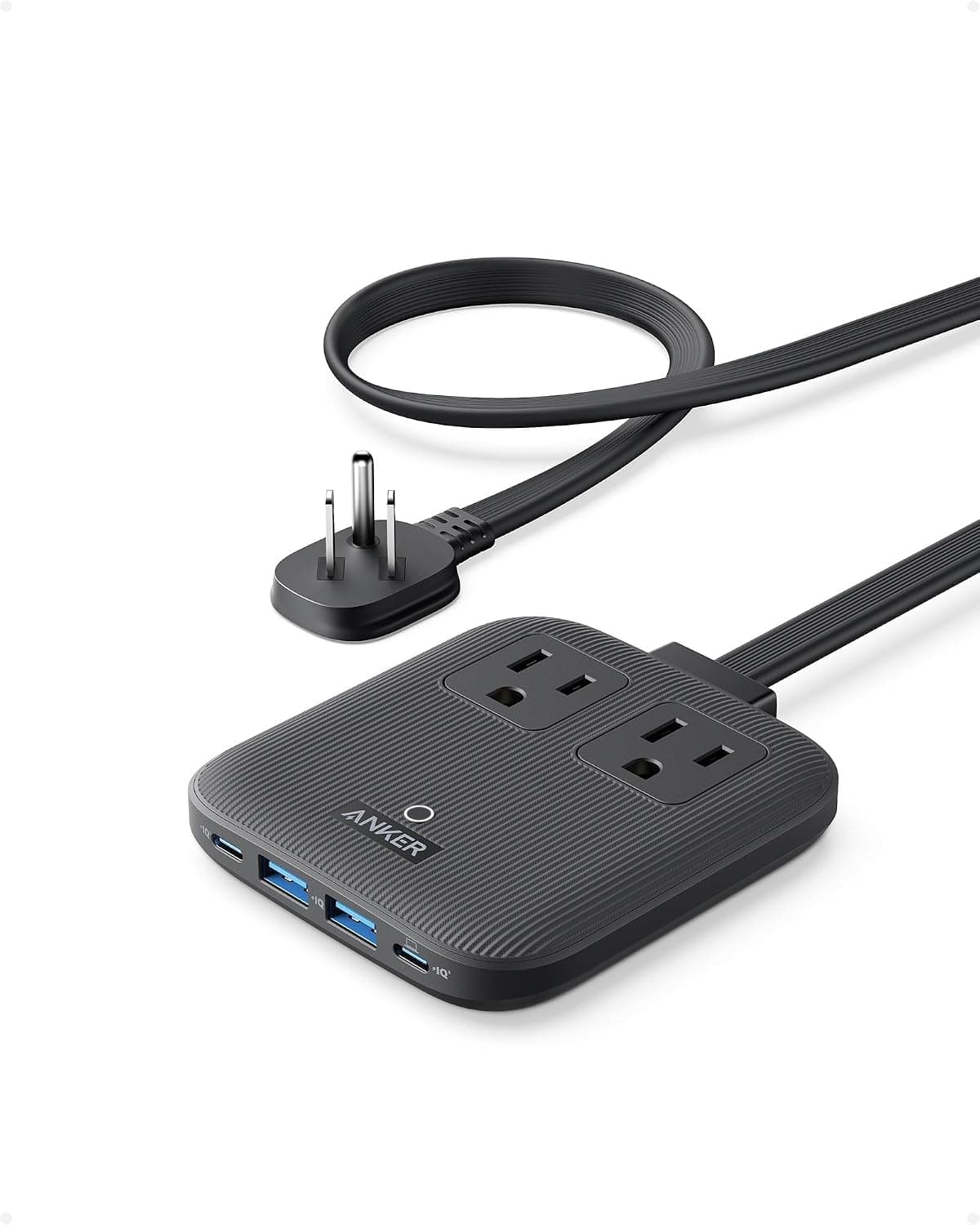
- AC outlets
- 2 (125V, 15A, 1,875W max)
- USB-C ports
- 2 (67W max single port; 45W + 20W when both in use)
- USB-A ports
- 2 (2.4A single; 15W shared)
- Cord length
- 5 ft (1.5 m), flat, not detachable
- Size and weight
- 3.94 x 3.66 x 0.75 in; 13.7 oz
- Input voltage
- 100 – 240V for the USB module; AC outlets rated 125V
About this pick
The Anker Nano Charging Station is the current version of Anker's travel power strip: two AC outlets, two USB-C ports with 67W Power Delivery on a single port, and two USB-A ports in a slab 0.75 in thick. The flat 0.35 in plug clears the neighbouring outlet, the 5 ft cord reaches across a hotel room, and the whole thing weighs 13.7 oz. It replaced the discontinued 615 GaNPrime as Anker's compact travel strip.
More specifications
- Surge protection
- None rated in joules (over-voltage, short-circuit, and ActiveShield 2.0 thermal protection)
Strengths
- 67W USB-C charges a 13-inch or 14-inch laptop at full speed, so the laptop brick stays home
- Flat plug and 0.75 in body fit behind hotel furniture where a boxy strip will not
- 5 ft cord reaches from the outlet behind the bed to the nightstand; the old 615 had 3 ft
Weaknesses
- Cord is not detachable, so it packs as one 13.7 oz piece
- No joule-rated surge protection; AC outlets are 125V-rated, so only plug dual-voltage bricks into them abroad
Kit Score breakdown
CEPTICS
Ceptics Travel Power Strip PS-2U+
Editor's Choice
Kit Score 8.3/10
$34.99 Price checked Oct 23, 4:16 PM CDT
Best for: Frequent international travelers who want one device that adapts to any country's wall socket while keeping US outlets and USB ports available simultaneously.
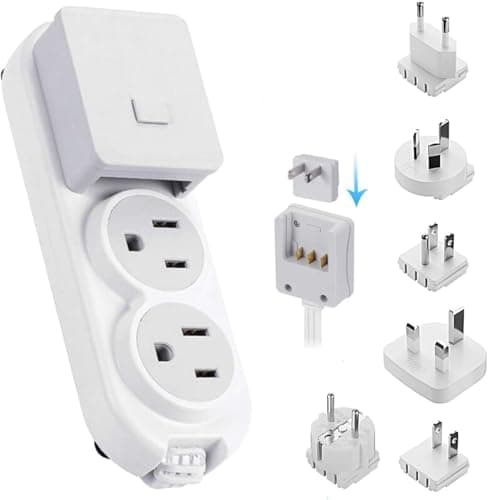
- Modular plug adapters for Europe, UK, Japan, Australia, and more snap on and off without tools, replacing a whole adapter kit
- Ceptics does not publish a joule rating, so the surge protection level cannot be compared directly to the Accell or Anker strips
- AC outlets
- 2 (US standard NEMA 5-15, grounded)
- USB-C port
- 1 (up to 2.1A)
- USB-A ports
- 1 (up to 2.1A)
- Surge protection
- Built-in (joule rating not published by Ceptics); ETL Listed, RoHS Compliant
- Input voltage
- 100 – 240V; max 1500W, 10A
- International plug coverage
- Interchangeable SWadAPt adapters for Type A (JP), Type B (US), Type C (EU), Type E/F, Type G (UK), Type I (AU)
About this pick
The Ceptics PS-2U+ packages two US-outlet sockets, one USB-C port, one USB-A port, built-in surge protection, and a modular international plug system into a sub-5-oz form factor. The swappable adapter heads cover more than 150 countries without a separate adapter pouch, and the 100 – 240V input handles any hotel grid voltage automatically.
More specifications
- Dimensions
- 5.35 x 2.0 x 1.0 in, under 5 oz
Strengths
- Modular plug adapters for Europe, UK, Japan, Australia, and more snap on and off without tools, replacing a whole adapter kit
- Built-in surge protection is confirmed in listing and the unit is ETL Listed and RoHS Compliant
- Under 5 oz and 5.35 inches long; fits in a jacket pocket with a travel pouch included
Weaknesses
- Ceptics does not publish a joule rating, so the surge protection level cannot be compared directly to the Accell or Anker strips
- No cord: the strip plugs directly into the wall, so it does not extend reach to a distant outlet across the room
- Only one USB-A port (listing description: '1 USB inputs'); candidate data overstated this as two
Kit Score breakdown
See all picks in Best travel power strips 2026: compact charging for hotels
Keep going
Free toolPower Bank Size CalculatorHow big a power bank your trip needs, and whether it can fly.

Researched, not hands-on tested
Updated Sep 13, 2026Our recommendations draw on manufacturer documentation, retailer listings, owner feedback, and comparisons with alternatives.
As an Amazon Associate I earn from qualifying purchases. We may earn a commission from links here, at no extra cost to you. How we research →